Product design / Practical notes
A UX Audit Checklist to Use Before a Redesign
Walk through a real task, include one interruption and record what stopped the person from continuing. Then choose a repair that fits the evidence.
Set up a real starting condition
A useful audit starts from a believable situation. Specify the person, their starting state, the task and the result they need. Otherwise, a neat checklist can drift into reviewing screens nobody uses in that order.
Use realistic content and record the environment. Keep the evidence close enough that someone else can repeat the same review.
Walk the task, then the exception
| Area | Inspection question | Evidence to capture |
|---|---|---|
| Orientation | Can the person identify location and purpose? | Labels, current state and entry path |
| Action | Is the consequence understandable before commitment? | Action text and review context |
| Input | Are requirements and correction paths clear? | Validation and retained values |
| Waiting | Does the interface explain what it is waiting for? | Progress or pending state |
| Failure | Can the person continue without losing useful work? | Error and recovery sequence |
| Completion | Is the result distinguishable from an attempt? | Saved record, confirmation or next state |
Inspect access and alternate input
Repeat the core path with a keyboard and a narrow viewport. Check meaningful names, visible focus, logical order and whether fixed controls cover the current task. Review zoom and the mobile keyboard rather than treating a small screenshot as responsive verification.
For role-based software, try a direct route and an unavailable action with the correct test account. Record what the server and interface actually do; a hidden button is not evidence of authorization enforcement.
Review the request and its final check together
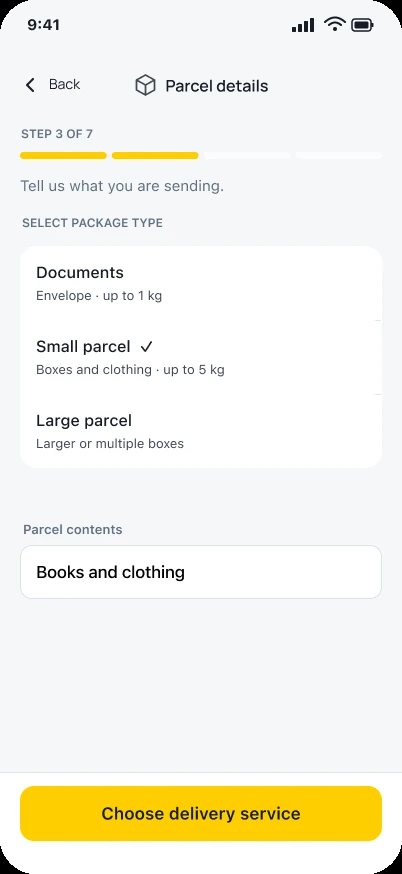
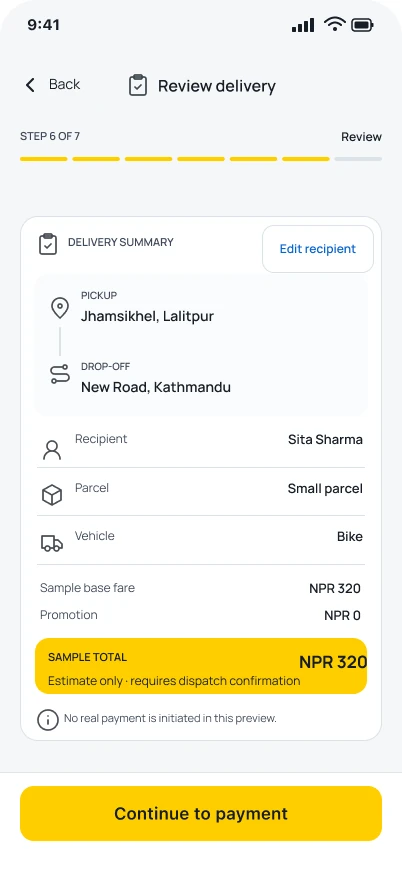
Zapp’s parcel screen collects what is being carried. The delivery-review design then brings pickup, recipient, parcel and a sample estimate together before payment.
I would use the pair to ask whether the customer can spot and correct a wrong detail. The static designs help define that task; the working flow needs its own check.
Turn the result into a bounded decision
Record the failure at the task level and separate confirmed behavior from a suspected cause. Preserve the conditions needed to reproduce it. Then decide whether the repair belongs in copy, layout, interaction, business rules or engineering.
The checklist is complete when it produces decisions someone can act on. It is not a certification that every state, role or assistive technology has been covered. State the tested scope and the remaining gaps explicitly.